Thursday, January 10, 2013

Ray Tracer Part 3 - Shading

Phong Illumination on Scene

The purpose of this assignment was to implement the Phong Illumination model in the ray tracer assignment. In this picture there are 3 light models (format: (r, g, b, intensity)):

ambient ( 1, 1, 1, .2 ) 
diffuse ( .4, .4, .4, 1 ) 
specular ( 1, 1, 1, 1

For an "Extra", I implemented another Light Source. 

To show the differences with the different light sources and experiment with colors, I made the spheres an off-white (0.9, 0.9, 0.9). The Normal light source is the same as the light source above. The new light sources have the following model specifications: 

Red Light 
specular ( 1, 0, 0, 1 )
diffuse ( 1, 0, 0, 1)

Green Light
diffuse ( 0, 1, 0, 1 )
specular ( 0, 1, 0, 1 )

Blue Light 
diffuse ( .1, .1, 1, 1 )
specular ( .1, .1, 1, 1 )
3 light sources, Red, Green, and Blue
Red and Normal light
Blue and Normal light


Red and Blue, with Normal Light


Thursday, January 3, 2013

Dandelion - Starting Points and Seedlets

Dandelion with seedlet stalks and the geodesic sphere
they are created on, 3 tessellations.
The first pieces of this project have come through, with a basic dandelion structure to be replicated by user command. There is a simple expandable / contractible field for the dandelion(s) to sit on, along with a single dandelion placed in the front left corner. This dandelion has a head created by a tessellated (geodesic) sphere. The user can increase the number of seedlets on the dandelion by increasing the number of tessellations. In the pictures, you can see the tessellations of 2 and 3.

From researching dandelions, I learned that they have fractal qualities to them, as they are structured around in a geodesic dome. I used this quality to structure the even spaces between each seedlet stalk. At each point on the sphere, I created a stalk back to the center of the dandelion.

Some changes that need to happen is for this to happen on a dome instead of a sphere. I'll need to cut off the bottom of the sphere to create that effect. Dandelions have a small "platform" in their center, not a ball. I also need to generate a thicker stalk for each seedlet.

At the tip of the seedlets are a base (a simple gluSphere for now) for the individual hairs that will stick out for a "furry" appearance that the dandelions have.

A basic camera is set up for viewing the field. It can be controlled with W, A, S, D. The field can be increased with J, and decreased with K.

The next step is creating multiple dandelions on demand, as well as setting up cameras for each individual dandelion.

Dandelion with seedlet stalks, without geodesic
sphere, and 2 tessellations.
Dandelion with seedlet stalks without the sphere
structure. With 3 tessellations.

Wednesday, January 2, 2013

Ray Tracer Pt 3 : Basic Shading


Phong Illumination / Shading

The purpose of this assignment was to implement the Phong Illumination model in the ray tracer assignment. In this picture there are 3 light models (format: (r, g, b, intensity)) ambient(1, 1, 1, .2), diffuse(0, .3, .3, .6), and specular(1, 1, 1, 1).

For an "Extra", I implemented another Light Source. 

To show the differences with the different light sources and experiment with colors, I made the spheres white. The new light source has the following model specifications: specular(0, .4, .4, 1) and diffuse(.4, .4, 0, 1). The first image is both light sources, and below that are each light source alone.

Both Light Sources
Light Source #2
Light Source #1

Tuesday, December 18, 2012

Ray Tracer Part 2 - Camera Modeling

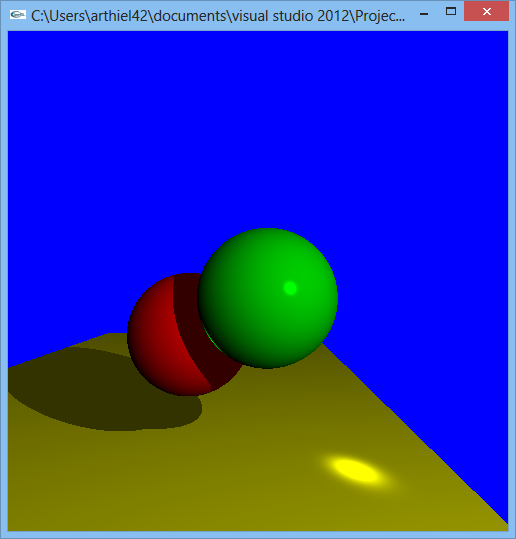
For this part, the assignment was to start shooting the initial rays at the scene. This is the result from calculating the intersection of the two spheres and the plane, while returning the color of the object when it was struck by the ray.

Tuesday, December 11, 2012

Dandelion Generation

I. Summary 

Dandelions have many different pieces to their flower (seedlets) that have many different characteristics to make them look unique and give them a slightly fuzzy appearance. The goal of this project is to generate dandelions based on these characteristics. It will also allow a user to alter the characteristics of each dandelion to explore how it changes the overall appearance of the flower.

The 3D scene that will be generated from this will be a single floor of any given size, holding the given number of dandelions. The user can control how many dandelions and what size the floor of the scene is. Other than the floor and dandelions, there will be nothing else in the scene. A light source will be placed somewhere to highlight the dandelions, and a camera will exist for the user to explore the different dandelions close up and far away.

The rendering pipeline will be modified at the Modeling Transformation. The dandelion(s) must be created and positioned as a model in a scene before they can be taken in for the rest of the pipeline.

II. Objectives

  • Generate a dandelion using particle systems 
  • Make a camera that allows a user to center on a dandelion and move around different dandelions from different distances. 
  • Make an interface to control the different seedlet characteristics (number of seedlets, number of smaller seedlet pieces, width of seedlets, length of seedlets, length of smaller seedlet pieces etc.) 
  • Allow multiple dandelions to be generated. 

III. System & Software

I’ll be using OpenGL with C++ on a Windows8 machine with Visual Studio 2012. 

IV. Project Components

  • Keyboard (camera) controls: Controls the camera using the arrow keys to circle around each dandelion. J and K will be used to switch between current and previous dandelion (if more than one). A and S will be used to zoom in and zoom out respectively. O will be used to view a camera not focused on any dandelion. 
  • GUI: There will be a gray box on the side of the window that has sliders for how many seedlets on the flower, how many hairs on the seedlet, length of the seedlet, length of the hairs, and width of the seedlets and width of the hairs. 
  • The scene window containing the generated dandelions and floor.

V. Project Timeline 

  • Midpoint (Week 6) : Have multiple dandelions generate on a plane. No differences amongst dandelions yet, just the set up for the scene and the different components of the dandelion set up in the code. This includes the camera moving to different dandelions. 
  • Week 8: The dandelions should be generated different from each other. 
  • Week 10: Allow the user to modify the seedlet characteristics. 
  • Week 11: Have all objectives finished and polished. 

VI. Final Presentation

The project will be demonstrated with a short slideshow of what was done throughout the project, with pictures of scenes / screenshots of the project from different points of the project. There will be a short demo of interesting features at the end of the presentation.

Wednesday, December 5, 2012

CG2 Ray Tracer Part 1 - Setting the Scene

My Scene Set-up
Original Image
For the first part of the ray
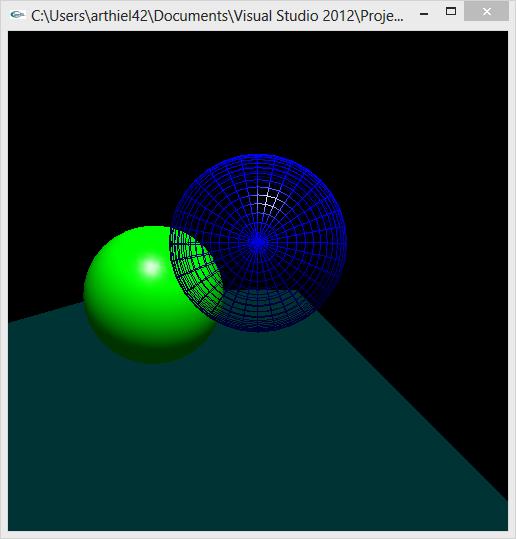
tracer assignment, we had to set the scene and collect the coordinates/locations of each object in the scene. In my set-up, the blue wire-frame sphere is the Glass Ball. The green solid sphere is the mirrored ball. Finally, the solid teal floor is the red/yellow checkered floor in the original image.


The coordinates are as follows:


// Blue Ball ( Glass )
glTranslatef( 80, .7, 155 );
glutWireSphere( 8, 32, 32 );


// Green Ball ( Mirror )
glTranslatef( 68, -5, 140 );
glutSolidSphere( 8, 32, 32 );


// Floor
glBegin( GL_QUADS );
glVertex3d( 100, -20, -100 );
glVertex3d( 10, -20, -100 );
glVertex3d( 10, -20, 200 );
glVertex3d( 100, -20, 200 );
glEnd();

// Camera 
gluLookAt(80, 0, 210, 80, -20, -200, 0, 5, 0 ); 

// Light Source
GLfloat light_pos[] = { .3, 1.0, 1.0, 0.0 };
GLfloat spec[]  = { 1.0, 1.0, 1.0, 1.0 };
GLfloat shiny[] = { 100.0 };
GLfloat ambient[] = { 1.0, 0.2, 0.2, 1.0 };